TEAM GROUP T253E2002T0C101 Ssd Internal Solid Drive 0765441052734 EX2 2.5 2TB
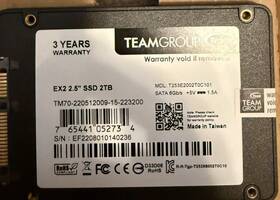
( Brand: Team Group ), ( Manufacturer Part Number: T253E2002T0C101 ), ( UPC: 765441052734 ), ( Compatible With: Laptop, Pc ), ( Color: Silver ), ( Item Length: 3.90 In ), ( Form Factor: 2.5 In ), ( Type: Internal Ssd ), ( Read Speed: 550mb/s ), ( Drive Type S Supported: Ssd, Internal Ssd ), ( Item Height: 0.87 Inch ), ( Transfer Rate: 550 Mbps ), ( Storage Format: Hdd Ssd ), ( Storage Capacity: 2tb ), ( Item Width: 2.80 In ), ( Interface: Sata Iii, Sata I )
Review TEAM GROUP Ex2 2.5 Inch 2tb Ssd Internal Solid State Drive
The Team T253E2002T0C101 ex2 is a high-performance 2.5-inch internal solid-state drive (SSD) that offers a generous storage capacity of 2 Terabytes (2TB). This SSD is designed for use in various computing systems, including desktops, laptops, and servers, providing a fast and reliable alternative to traditional hard disk drives (HDDs).
The Team T253E2002T0C101 ex2 SSD features a SATA III interface, which allows it to deliver data transfer speeds of up to 6 Gbps. This ensures that your system can read and write data at an impressive rate, significantly reducing boot times, application loading times, and file transfer speeds.
The SSD is built using MLC (Multi-Level Cell) NAND flash technology, which provides excellent data reliability and endurance. It also features advanced error correction code (ECC) technology, which helps to protect your data from potential corruption due to errors during read and write operations.
The Team T253E2002T0C101 ex2 SSD is also known for its low power consumption, making it an ideal choice for laptops and other portable devices. It operates at an average power consumption of less than 0.15 watts during idle state and less than 0.45 watts during active state, ensuring that it does not drain your device's battery unnecessarily.
The SSD is also shock-resistant and operates in a wide temperature range, making it suitable for use in various environmental conditions. It comes with a 3-year warranty, providing you with peace of mind and ensuring that your investment is protected.
In summary, the Team T253E2002T0C101 ex2 2.5-inch 2TB SSD is a high-performance, reliable, and energy-efficient storage solution that can significantly improve the performance of your computing system. Its advanced features, including SATA III interface, MLC NAND flash technology, ECC technology, and low power consumption, make it an excellent choice for both personal and professional use.
Pros of buying a T253E2002T0C101 EX2 2.5 2TB SSD internal solid drive:1. High capacity: With a storage capacity of 2TB, this SSD can store a large amount of data, making it ideal for users with heavy data storage needs.
2. Fast data transfer rates: SSDs are known for their fast data transfer rates compared to traditional HDDs. This drive offers read and write speeds of up to 560MB/s and 540MB/s respectively, ensuring quick data access.
3. Durable: SSDs do not have moving parts, making them more durable and less prone to physical damage, such as scratches and breaks.
4. Energy-efficient: SSDs consume less power than HDDs, making them a good choice for laptops and other portable devices.
Cons of buying a T253E2002T0C101 EX2 2.5 2TB SSD internal solid drive:1. Expensive: SSDs are generally more expensive than HDDs with the same capacity. The T253E2002T0C101 EX2 2.5 2TB SSD is no exception, making it a higher investment.
2. Limited upgradeability: SSDs have a limited lifespan, and once they reach their limit, they cannot be upgraded.
Conclusion:The T253E2002T0C101 EX2 2.5 2TB SSD internal solid drive is a great choice for users with heavy data storage needs and who value fast data access. Its high capacity, fast data transfer rates, and durability make it an excellent option for both desktops and laptops. However, its high price and limited upgradeability are considerations to keep in mind. Ultimately, the decision to purchase this SSD should be based on your specific needs and budget.
Recommendation:If you require a large amount of storage and value fast data access, the T253E2002T0C101 EX2 2.5 2TB SSD internal solid drive is a recommended option. However, if cost is a concern, consider looking at lower capacity SSDs or HDDs. If you don't require a large amount of storage, an HDD may be a more cost-effective option for you.
Details:
Was used just as long term storage. Almost no wear.
part #: t253e2002t0c101 prices
- $49.99-$142.99
specifications ssdaxz:
- brand: Team Group
- mpn: T253e2002t0c101
- upc: 765441052734
- compatible with: Laptop, Pc
- color: Silver
- item length: 3.90 In
- form factor: 2.5 In
- type: Internal Ssd
- read speed: 550mb/s
- drive type s supported: Ssd, Internal Ssd
- item height: 0.87 Inch
- transfer rate: 550 Mbps
- storage format: Hdd Ssd
- storage capacity: 2tb
- item width: 2.80 In
- interface: Sata Iii, Sata I
shipping ssdaxz:
- carrier: USPS
- service: USPS Ground Advantage
- transit: 5-13 Days
- cost: $4.47
- type: Calculated
- class: Standard
seller ssdaxz:
- # reviews: 512
- city: Louisville, Kentucky
- rating: 100.0%
offer ssdaxz:
- quantity: 2
- started: December 18, 2024
- options: Ship-to-home
- availability: In Stock
- sold: 0
general ssdaxz:
- condition: Used
- Drives, storage Blank Media > Hard Drives HDD, SSD NAS > Solid State Drives
payments ssdaxz:
- wallet: Paypal
- other
- credit card: Diners-club
returns ssdaxz:
- policy: No Returns
Team Group T253E2002T0C101 Is Similar To:
- 765441034471 Team Group Lite Sata Iii Nand Internal Solid (45.8% similar) Team Group l5 lite 5/1 20GB sata iii 2d band internal solid state drive ssd. Like new condition, comes in original packaging not sealed. Works perfectly, used for a week and realized that I needed larger drive...(September 1st, 2018)
- 765441037663 Team Group Lite Sata Iii Nand Internal Ssd (41.9% similar) Brand new 240GB ssd from Team Group. Free shipping...(April 17th, 2018)
- T2535t060g0c101 Team Group Lite Sata Iii Internal Solid State Drive Ssd (56.6% similar) Up for offer is a used one week ssd hard drive. It should also still be under warranty as comes with a 2YR manufacturer and purchased this from new egg approx 5 months ago. I installed WIN10 and used for a week. Has been formatted, no operating system comes with this drive. Long story short, I ...(September 30th, 2018)
- T2535t120g0c101 Team Group L5 Lite (27.8% similar) 33 or later WARRANTY3-YEAR limited warranty. 9 x 7MM HUMIDITY0 c to 55 RH,NON-CONDENSINGVIBRATION20G non-operating SHOCK1500GMTBF1,000,000 hours system requirements windows vista, mac OS or later, Linux 6GBS Nash with backwards compatibility sata rev. 0CAPACITY60 480GB voltage dc 5VOPERATION ...(September 7th, 2017)
- T2535t120g0c104 Team Group Lite Ssd Sata Iii Nand Internal Solid State (51.4% similar) 5-INCH hard drive with just 00MM width 69. 90MMDEPTH100MM...(July 19th, 2018)
- T2535t240g0c101 Team Group New L5 (26.2% similar) 5 CAPACITY240GB interfaces iii performance max sequential read up to 530 mbps write up 400 4KB random 65,000 oops 70,000 MTBF1,000,000 hours features FEATURES4X faster than a hdd: injects vitality into the system high performance: read speeds up 500 MB's boost overall responsiveness and slim form ...(August 15th, 2017)
- T2535t480g0c101 Team Group Lite Sata Iii Nand Ssd (32.5% similar) 00MM width 69.: monitors the status of your drive supports trim: maintains maximum performance compatible operating TEMPERATURE0 c Max shock RESISTANCE1500GMAX vibration RESISTANCE20G non-operating dimensions weight height 5-INCH drive available in 7MM to fit more systems even slimmer notebooks ...(June 3rd, 2018)
- T253l7240gtc101 Team Group L7 Evo (26.2% similar) Lower 48 states with physical street address only. Other areas including hi, AK, pr, please for shipping. Shipping is free...(May 14th, 2017)
- T253le240gtc101 Teamgroup New Gb Team Evo Ssd Drive Sata 765441027923 (36.4% similar) 5 ssd solid state drive Team group Team l3 Eco 240GB hard sata iii 3 year warranty part T253LE240GTC101 new sealed, retail packaging, over 100 in stock max sequential read up to 530 mbps Otto 500 crystal disk mark write up 470 430 4KB random read up 80,000 IOPS4KB 35,000 IOPSMTBF1,000,000 hours ...(May 23rd, 2018)
- T253td240g3c101 Team Group Sale L5 (29.6% similar) Free 2-DAY shipping sale ends I also have a 480GB for at 130, let me know if you are interested...(December 29th, 2017)
